Pages vs systems: why a website is the wrong unit of design
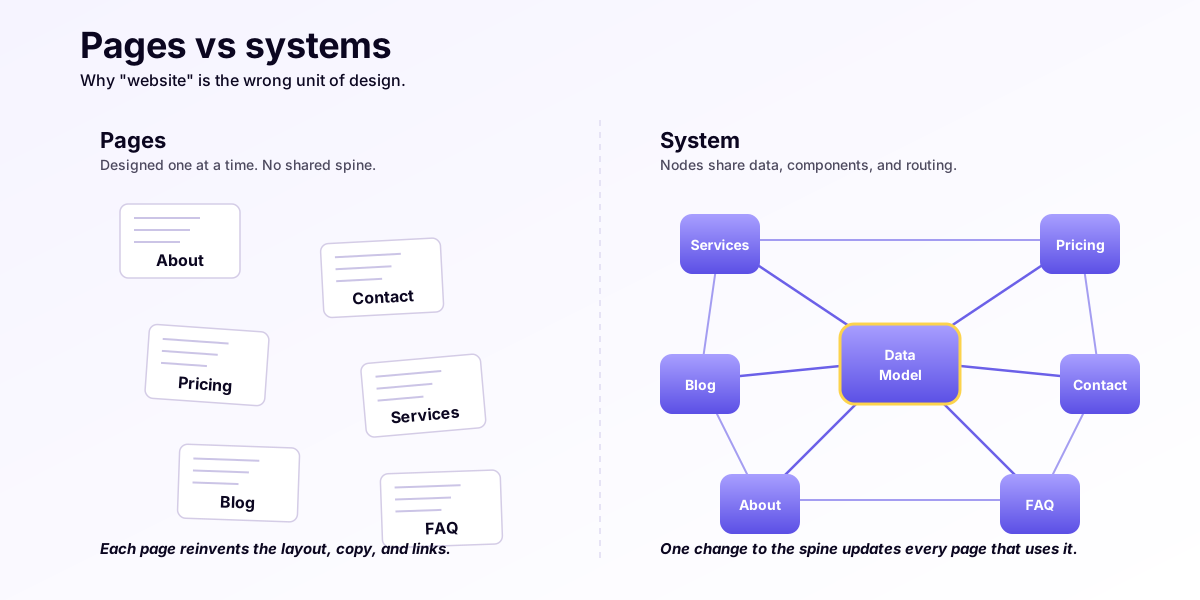
The /systems page makes the philosophical claim in one line: we don’t build pages, we build systems that run them. This piece defends the claim with worked examples — the systems UK Web Marketing client sites are actually made of, the cross-cutting work that lives outside any single page, and the commercial reason agencies that price per-page lose money on bookings, catalogues, and redirects.
If you’ve ever asked an agency “how much per page?” and got a number, you’ve watched them price the wrong unit of work. The right unit is the system. Here’s why.
What an agency sells you when they quote per page
The per-page quote is the legacy of brochure-printing pricing. Twelve pages, eight hundred pounds each, nine thousand six hundred quid, sign here. Each page is treated as a discrete deliverable: bespoke copy, bespoke visual, bespoke implementation. The mental model is a website is a stack of pages, where adding a page is a fixed marginal cost and removing one is a fixed marginal saving.
That model worked when websites were stacks of HTML files written by hand. It doesn’t work in 2026, because most of the actual engineering on a modern site isn’t in a page — it’s in the systems that produce pages.
A real example. A Leeds private clinic with fourteen service pages, four practitioner pages, a booking flow, a contact page, an about page, a pricing page, two legal pages, and a blog with twenty articles. Page count: 44. At an agency’s typical £600-£1,200 per page, that’s £26k-£53k. Sign here.
Now look at where the work actually is.
System 1 — the service catalogue
The fourteen service pages aren’t fourteen pages of work. They are one system rendering through fourteen URLs. The system is:
- A content collection (
src/content/services/) with a schema that defines what a service is — title, category, duration, price, practitioner relationships, body content, FAQs. - A render template (
src/templates/ServicePage.astro) that takes one service record and produces one rendered HTML page. - A routing config that maps every record in the collection to a URL automatically (
src/pages/services/[slug].astrowithgetStaticPaths).
Build the system once. Adding a fifteenth service is a five-minute job: one new file in the collection, the existing template picks it up. The agency quoting £900 for the fifteenth page is charging for work that takes five minutes.
The cost the catalogue model exposes is the first service page. That one is genuinely 1-2 days of work, because it includes the schema, the template, and the routing. After that, the marginal cost per service approaches zero.
So the honest pricing isn’t “fourteen pages at £900.” It’s “service catalogue system: £4,500, includes the schema, template, routing, and the first fourteen entries; further entries free.” That’s the same total, distributed against the unit where the work actually lives.
System 2 — the booking module
The booking flow on a UK clinic site looks like four pages: /booking (the form), /booking/availability (the slots view), /booking/confirm (the review step), /booking/done (the confirmation). But the work isn’t in those four pages.
The work is in the booking system:
- A
BookingProvidercontext that holds the in-progress booking state across the four URLs. - An API route (
/api/bookings/create) that writes the booking to the database, sends the confirmation email via Resend EU, and posts to Capsule CRM. - A signature-verified Stripe webhook (
/api/webhooks/stripe) that updates the booking when payment confirms. - A render-time integration that pulls live practitioner availability from a Google Calendar service-account, falling back to “request a call” when the calendar API rate-limits.
The four /booking/* pages are the surface of the system. They share state, share logic, share validation. The booking system also touches the /services/[slug] pages (each renders a “Book this service” CTA that pre-fills the booking form), the /team/[slug] pages (each shows a practitioner’s next available slot), and the /contact page (which uses the same form primitives).
So the booking system lives across six pages on the public surface, plus the API routes, plus the webhook handler. Agencies that price per page miss two-thirds of this work — they charge for the four /booking/* pages and quietly under-deliver on the integration depth that makes the system worth shipping. Or they charge for the integration as a “custom feature” line item that the client has no framework for evaluating.
System 3 — the redirect layer
Possibly the most underpriced system in the agency world.
Every redesign of an established UK SMB site touches dozens of URLs. Old /our-services becomes new /services. Old /about-us/the-team becomes new /team. Old WordPress /?p=247 becomes new /blog/getting-found-on-google. If those redirects don’t ship as 308 permanent redirects on day one of the new site, Google de-indexes the old URLs faster than it indexes the new ones, and the practice loses three to six weeks of organic traffic in the swap.
The redirect system on a UK Web Marketing build is a single TypeScript file:
// middleware.ts
export const redirects: Array<[from: string, to: string]> = [
  ["/our-services", "/services"],
  ["/our-services/dermatology", "/services/dermatology"],
  ["/our-services/aesthetic", "/services/aesthetic"],
  ["/about-us/the-team", "/team"],
  ["/about-us/the-team/dr-smith", "/team/dr-smith"],
  // ... 40-80 more rows
];
The middleware reads the list and emits a 308 response for any matching request. One file. One review with the SEO holder before launch. Forty to eighty backlinks worth of Google rank signal preserved through the redesign.
This is invisible to the per-page model. It produces zero new pages. It’s not a deliverable an agency lists in a quote. And it’s the single highest-ROI piece of any redesign — measurable in the organic traffic that doesn’t drop in the eight weeks after launch.
System 4 — the content production pipeline
The blog isn’t twenty blog posts. It’s a content production system that produces blog posts and a few other things.
The system:
- Markdown files in
src/content/blog/with a schema (content.config.ts) that enforces title, description, date, tags, optional pull quotes, optional TL;DR. - A category taxonomy in
src/lib/blog-categories.tsthat routes posts to topical hub pages (/blog/category/systems,/blog/category/clinics, etc.). - A related-posts engine that picks the three most relevant adjacent posts by tag overlap.
- An RSS feed at
/blog.xmland a sitemap entry for every published post. - An Open Graph image generator that takes the post title and produces a 1200×630 share image at build time.
Adding a twenty-first blog post is a six-line frontmatter block plus the body. The system produces the OG image, the related-posts band, the category breadcrumb, the RSS entry, and the sitemap row, all automatically.
The system is also what makes the difference between a blog that ranks and a blog that doesn’t. Without the category taxonomy and the related-posts engine, every new post is an island Google has to discover from scratch. With them, every new post inherits the authority of every previous post in the same cluster. That’s an SEO compounding effect — the systems article you’re reading right now ranks higher because the 0.05-second test and Vercel vs Netlify vs Cloudflare Pages link to it.
System 5 — the compliance posture
The compliance system isn’t on a page — it’s the constraint applied across every page. (See EU-sovereign stack for UK SMBs for the vendor picks that make this work.)
The system:
- No analytics on
/booking/confirm(lawful basis exception — Article 6(1)(b) contract performance only). - No third-party form on
/contact(form posts to first-party API, then to Capsule). - A
/compliancepage that lists every sub-processor with country and DPA links. - A cookie posture: zero cookies set by the site itself, Plausible analytics cookieless by design, no banner needed.
- A privacy policy generated from the sub-processor list, so it can’t drift out of sync.
Five pieces of work, none of which is “a page.” All of which are required if the site is being shipped to a clinic, a solicitor, a school, or an accountancy practice.
Why this maps to subscription pricing
The systems above don’t have a one-off cost. They have a maintenance cost. The catalogue system needs the schema updated when services change. The booking system needs the Stripe webhook updated when prices change. The redirect layer needs new rows when URLs move. The content pipeline needs the new posts. The compliance posture needs an annual sub-processor review.
This is the case for monthly subscription pricing over agency one-offs. The unit of recurring work is the system, not the page. Agencies that one-off the build and walk away leave the systems unmaintained — and six months later the booking integration breaks because Stripe rotated an API version, the redirects don’t cover the URLs added since launch, and the compliance page lists a sub-processor that got acquired in Q3.
Per-page pricing also can’t accommodate the removal of pages cleanly. If the clinic stops offering a treatment, the per-page model leaves the page sitting there. The system model removes the row from the content collection, ships a redirect to the most-relevant remaining service, and the work is done in fifteen minutes.
The four questions a per-page agency can’t answer
When you’re being quoted, ask:
- “How do you handle the fifteenth service page?” A systems builder says “schema update plus a content entry, free.” A per-page agency says “£600-£1,200.”
- “What happens to my old URLs when you launch the new site?” A systems builder shows you the redirect file. A per-page agency says “we’ll set up redirects” with no plan.
- “How does my booking page know which practitioner is available?” A systems builder shows you the calendar integration. A per-page agency builds a static “Book now” button.
- “Who maintains this in six months?” A systems builder names a subscription. A per-page agency names a re-quote.
Four questions, four different answers, two different commercial models.
Closing — what to do with this
The systems view is the /systems page thesis. The build order that produces systems is in Information architecture before design. The performance that systems deliver is in Core Web Vitals under one second. The compliance posture that systems enforce is in EU-sovereign stack for UK SMBs.
If you want a build priced by system rather than by page: managed website service. If you want to see which systems are missing from your current site: free audit.