Information architecture before design: the order UK SMB sites ship in
On this page
- 1. The URL graph, before anything else
- 2. The render contract, typed before designed
- 3. The content model, schema before copy
- 4. Components, composed against the contract
- 5. Visuals, last
- What goes wrong when the order inverts
- What the order looks like for the three regulated verticals
- Closing, what to do with this
You do not design a building by deciding what colour the front door is. You decide where the load-bearing walls go, then where the rooms sit, then what they are for, then how they connect, then, last, what the place looks like. A surveying lecturer at Loughborough taught our founder that order in 2014, and we have never seen a website project that did not benefit from it.
The default UK agency workflow inverts the whole thing. Figma opens on day one. The homepage hero gets mocked. The client signs off “the look.” Then the developer is handed a 40-frame design file and asked to make it real on a CMS that cannot produce the content shapes the hero needs. Six weeks of rework follow. Two years later the site needs replacing because the data model never matched the business.
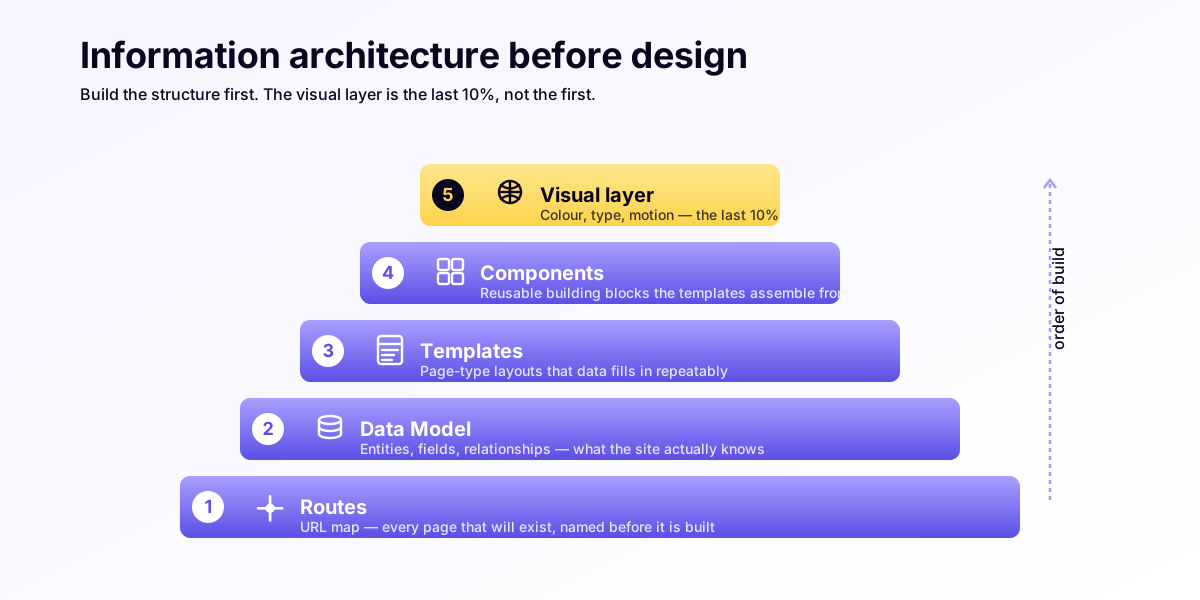
This piece walks through the correct order, routes → render contract → content model → components → visuals, through a real Growth-tier build, and shows what each artefact looks like in the codebase.
1. The URL graph, before anything else
The first artefact is a routes.ts-style URL map. Not a sitemap.xml, a TypeScript file that names every page the site will serve, what slug pattern it uses, and what kind of resource lives at it.
For a Leeds private clinic running fourteen treatment service pages, the URL graph looks like this:
// src/lib/routes.ts
export const routes = {
  home: "/",
  about: "/about",
  services: "/services",
  service: (slug: string) => `/services/${slug}`,
  team: "/team",
  teamMember: (slug: string) => `/team/${slug}`,
  contact: "/contact",
  booking: "/booking",
  bookingConfirm: "/booking/confirm",
  pricing: "/pricing",
  legal: { privacy: "/privacy", terms: "/terms" },
} as const;
Boring. That is the point. The URL graph is the commitment, to Google, to the client, to your future self, that these URLs exist and will not change. Every page on the site has a stable canonical address before a single component is built.
The commercial value is concrete: the URL graph is what holds search rankings through a redesign. When the visual layer gets replaced two years in, the URLs do not move, so the backlinks Google has been counting since 2024 still resolve.
2. The render contract, typed before designed
The render contract is the TypeScript interface that says what props every page template needs. It is the second artefact, and it has to exist before Figma opens.
For the same clinic, the service-page render contract:
// src/templates/ServicePage.ts
export interface ServicePageProps {
  slug: string;
  title: string;          // h1
  metaDescription: string;
  hero: { headline: string; subhead: string; cta: { label: string; href: string } };
  whatItIs: { body: string; bullets: string[] };
  whoItIsFor: { body: string; conditions: string[] };
  practitioners: Array<{ slug: string; name: string }>;
  pricing: { from: number; currency: "GBP"; sessions?: string };
  faqs: Array<{ q: string; a: string }>;
  related: Array<{ slug: string; title: string }>;
}
This interface is the contract between the designer and the data. Every visual element on a service page is something this object can produce. Nothing else.
The mistake agencies make is letting the designer mock up a hero with three rotating testimonials, a video background, and a live availability calendar, when the CMS the practice will actually run on is Decap (or, worse, a Wix block library) and none of those things have a place to live. The render contract makes that mistake impossible because the contract is checked-in code, not a Figma comment.
3. The content model, schema before copy
The third artefact is the content collection schema. For an Astro site, that is content.config.ts. For a Sanity/Decap site, it is the studio schema file. The content model is the database in disguise: every field, every type, every required-vs-optional decision.
A treatment service is not a “page.” It is a row in a services collection with named fields:
// src/content.config.ts
const services = defineCollection({
  schema: z.object({
    title: z.string(),
    slug: z.string(),
    category: z.enum(["aesthetic", "dermatology", "wellness"]),
    durationMinutes: z.number(),
    priceFromGbp: z.number(),
    practitionerSlugs: z.array(z.string()),
    bodyMd: z.string(),
    faqs: z.array(z.object({ q: z.string(), a: z.string() })).default([]),
  }),
});
Now the content model is also typed. Astro will refuse to build if a service record is missing priceFromGbp. That refusal is the system catching a content error at build time, not at 3am when a clinic owner notices the price field is blank on a live page.
The commercial value: a fourteen-page service catalogue is not fourteen pages of work. It is one template, one schema, and fourteen rows. Adding a fifteenth service is a five-minute job, not a four-hour job. Solicitors with a forty-matter-type catalogue, accountants with a thirty-service practice menu, schools with twenty department pages, all the same shape.
4. Components, composed against the contract
Only now, when routes, contracts, and content models exist, do components get built. Each component renders one piece of one contract. The <ServiceHero> component takes props.hero and renders it. It does not reach into the page’s other props. It does not know what a service is. It knows what a hero is.
The discipline is single-purpose components against the contract, not the visual decomposition of a Figma mock. A “hero with three rotating testimonials” is two components: <ServiceHero> and <TestimonialCarousel>. They are independent. They can be reused on the about page, the team page, the pricing page. The visual is a composition of the system, not a bespoke render.
This is also where progressive enhancement gets enforced. Every component ships as static HTML first; interactivity is layered on top via client:visible islands. The contract does not change when JavaScript breaks. The render still works.
5. Visuals, last
Now, finally, the designer opens Figma. The brief is not “design a homepage.” The brief is “design the visual layer of this system.” The system already exists, routes, contracts, content, components, and the visual layer is the surface that wraps it.
This is the inversion that saves the six weeks. The designer cannot mock up a hero that the CMS cannot produce, because the CMS schema is the source the designer is working from. The developer does not get handed an impossible spec. The content team does not get asked to write copy for a slot that does not fit anything they have ever written.
We run this with Stripe-docs / Linear-changelog / Vercel-docs as the tonal anchors, calm, restrained, document-like. The visuals serve the system. They do not fight it.
What goes wrong when the order inverts
Three failure modes, all of them we have seen this year on UK SMB sites:
- The orphaned hero. Designer mocks a hero with a “live appointment counter.” Nobody costed the booking-system integration. It ships as a static “Book now” button. The hero looks empty for the next two years.
- The page that does not exist. Designer mocks a “team member detail page” with a video bio. The content model does not have a video field. Half the team members never get their pages built. The site’s information architecture has a missing limb.
- The redesign that breaks SEO. Two years later, a visual refresh changes every URL because the routes were never canonical. Google de-indexes the site for six weeks. The clinic’s organic traffic halves. (See the 0.05-second test for what that traffic was already worth.)
All three are prevented by the build order.
What the order looks like for the three regulated verticals
Clinics. Routes: /services/[slug], /team/[slug], /booking, /contact. Render contract enforces “no analytics on /booking/confirm” (GDPR), “no third-party form on /contact” (ICO posture). Content model has practitionerSlugs so a service knows who delivers it. Visuals last.
Solicitors. Routes: /services/[matter-type], /people/[solicitor], /insights/[slug], /contact. Render contract enforces SRA Transparency Rules, every /services/[matter-type] page must surface a fee structure and complaints route. Content model has feeBasis: "fixed" | "hourly" | "estimate". Visuals last.
Accountants. Routes: /services/[slug], /team/[slug], /resources/[slug], /contact. Render contract enforces “no third-party chat widget anywhere” (ICAEW confidentiality). Content model separates taxYear for any guidance content so 2025/26 advice does not get served as if it is 2026/27. Visuals last.
The pattern repeats. The order is the same regardless of vertical. The vertical only changes which constraints get baked into the render contract.
Closing, what to do with this
If you are being quoted by an agency right now, ask three questions:
- “Can I see the URL graph before we sign off the visual?”
- “What does the page template’s TypeScript contract say a service page needs?”
- “Where does the content live, and what is the schema?”
If the agency cannot answer those three, the build will be visuals-first. Six weeks of rework, then two years of brittleness. If the agency can answer them, you have found someone who builds in the right order.
This is how every UK Web Marketing build ships, routes, contracts, content, components, visuals, in that order. Or run a site audit and we will show you which order yours was built in.
Pages vs systems, the build order, the inversion: more on the same thread in Pages vs systems: why a website is the wrong unit of design.
Frequently asked questions
What order should a website be built in?
The way an engineer lays a building: URL graph first, render contract second, content model third, components fourth, visuals last. By the time anyone opens a design tool, the system already exists. The reverse, Figma first, is how agencies ship sites that need replacing in two years.
What is a URL graph and why does it come first?
A URL graph is a routes file that names every page the site will serve, its slug pattern and the resource that lives at it. It comes first because it is the commitment that these URLs exist and will not change, which is what holds search rankings through a redesign: replace the visuals two years in and the backlinks still resolve.
Why should information architecture come before design?
Because designing visuals first lets a designer mock up things the content model and CMS cannot produce, which triggers roughly six weeks of rework per redesign. When routes, the render contract and the content model exist first, the designer works from the schema, so an impossible spec becomes impossible to draw.
What goes wrong when the build order inverts?
Three failure modes we see on UK SMB sites: the orphaned hero mocked with a feature nobody costed, the page that does not exist because the content model has no field for it, and the redesign that breaks SEO because the routes were never canonical and Google de-indexes the site for weeks.
What should I ask an agency about the build order?
Three questions: can I see the URL graph before we sign off the visual, what does the page template's TypeScript contract say a service page needs, and where does the content live and what is the schema. If the agency cannot answer those, the build will be visuals-first, meaning rework then brittleness.