Bitwarden vs 1Password vs Proton Pass: the UK SMB password-manager guide (2026)
On this page
- The short version
- The comparison matrix
- Bitwarden, the default recommendation
- 1Password, the polished option
- Proton Pass, the sovereignty-first option
- NordPass, the mainstream option (with a disclosure)
- The honest recommendation
- Where this fits into the bigger UK SMB tooling stack
- Sources & methodology
A typical UK small business runs on 30 to 100 separate credentials, Stripe, Companies House WebFiling, Google Business Profile, the host, the registrar, the CRM, the bank, the accountants’ portal. The honest count is always higher than the founder thinks.
The way most UK small businesses manage that is the same 3 to 4 passwords reused across everything, written in a Notes app on someone’s iPad. That is the breach pattern behind a large share of the small-business incidents that end up as ICO enforcement notices.
This piece compares the three password managers worth using if you are a UK SMB that takes data residency + GDPR posture seriously: Bitwarden, 1Password, and Proton Pass.
The short version
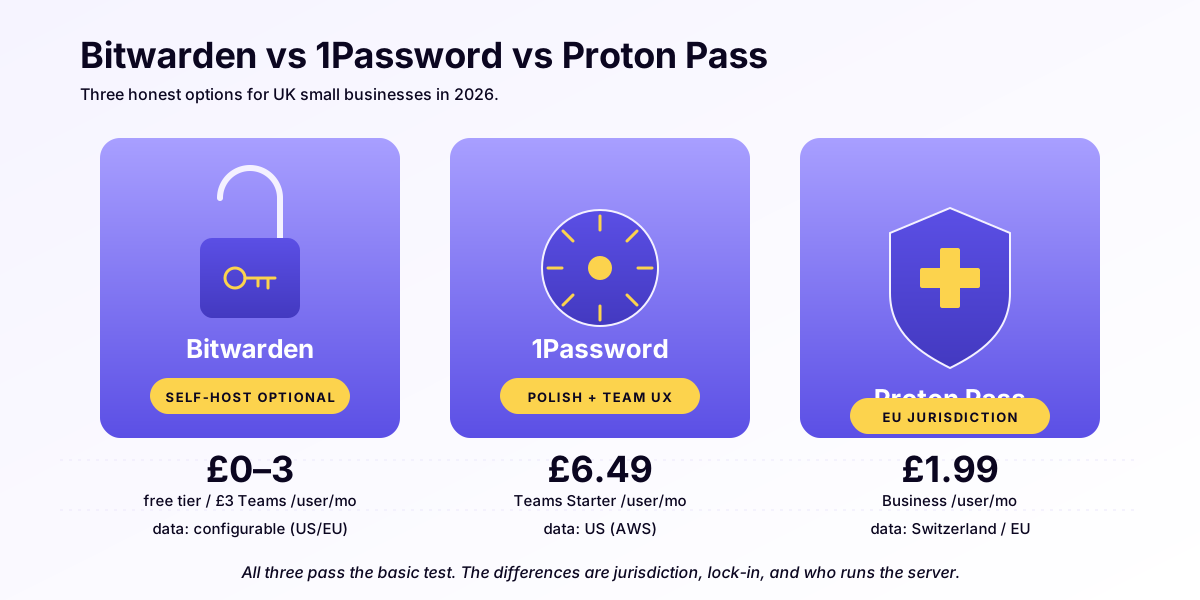
- Bitwarden, open-source, EU + US infrastructure, free tier covers a sole practitioner, paid tiers are cheap, audit-friendly. The default recommendation for most UK SMBs.
- 1Password, slickest UX, US-based (Canadian), more expensive, enterprise-tier features. Worth it if you have 10+ team members and need the polish. Breaks the EU-sovereignty story slightly.
- Proton Pass, Swiss, fits perfectly with Proton Mail if you are already on Proton’s stack, newer + still maturing. Strong sovereignty posture; smaller feature set than the other two.
If you take EU sovereignty seriously (a clinic, solicitors, school, or accountants holding regulated data), we would narrow to Bitwarden or Proton Pass. Both clear the bar; 1Password does not.
The comparison matrix
Last updated: 1 June 2026. Pricing in GBP where vendor publishes natively; otherwise current FX. Methodology: residency confirmed via each vendor’s published sub-processor or hosting documentation as of publication; security model confirmed via each vendor’s most recent third-party audit (where published).
| Criterion | Bitwarden | 1Password | Proton Pass |
|---|---|---|---|
| Company HQ | US (Bitwarden Inc., Santa Barbara CA) | Canada (1Password Inc., Toronto) | Switzerland (Proton AG, Geneva) |
| EU/UK vault residency | Yes, Frankfurt for EEA/UK/CH customers | No EU region; AWS US for all | Yes, Switzerland + Germany |
| CLOUD Act exposure | Mixed (US parent; EU storage) | Yes (Canadian parent, US AWS infra) | No (Swiss parent, Swiss/German infra) |
| Open source | Yes, server + clients on GitHub | No (clients partly; server closed) | Yes, clients open-source |
| Free tier | Unlimited passwords, 1 device | None | Unlimited passwords, basic features |
| Sole-practitioner price | £10/yr Premium | £2.99/mo (~£36/yr) | £3.99/mo Plus, or Free |
| 3-person team / yr | £108/yr (Teams) | £288/yr (Teams) | £180/yr (Family) |
| Self-host option | Yes (server is open source) | No | No (cloud only) |
| SSO/SAML | Enterprise tier only | Business tier | Enterprise tier (newer) |
| Where it is better | Cheapest, EU-resident default, audit-friendly | Slickest UX, Secret Key model, mature ecosystem | Sovereignty (Swiss adequacy), bundles with Proton Mail |
| Where it is worse | Less-polished UX than 1Password | US AWS infra, no EU region, highest team price | Newer (2023), smaller feature set, less third-party tooling |
| UKWM recommendation | Default for most UK SMBs | Only when 10+ team + UX trumps sovereignty | When already in Proton ecosystem or Switzerland-first |
Honest call-outs (because backlink-worthy means honest):
- 1Password’s Secret Key model is genuinely stronger than master-password-only encryption. If a server breach happens, 1Password’s two-factor cryptographic posture means attackers still need the locally-stored Secret Key. Bitwarden’s model relies on master-password strength alone.
- 1Password’s UX is the best of the three. I would be lying to claim otherwise. For teams used to it, switching to Bitwarden has a real friction cost.
- Proton Pass is still the youngest product, fewer integrations, no SAML on lower tiers, browser-extension polish is improving but lags 1Password.
The sovereignty trade-off goes the other way: Bitwarden’s EU-default residency + open source is the cleaner story for a UK SMB whose insurer or counsel will eventually ask.
Bitwarden, the default recommendation
Pricing: Free tier for an individual (unlimited passwords + 1 device, most sole practitioners are covered). Premium £10/year. Teams plan £3/user/month. Enterprise £5/user/month. Self-hostable.
Data residency: Customers in the European Economic Area, UK, and Switzerland have their vault data stored in the EU (Frankfurt). US customers’ data lives in the US. You can opt-in to self-hosting on your own infrastructure if you want full sovereignty (Vercel, Cloudflare Workers, a small VPS, all work).
Security model: Zero-knowledge architecture (Bitwarden never sees your master password or vault contents in cleartext). End-to-end encryption. Regular third-party audits published. Open-source (the client + the server are both on GitHub, audit-friendly for any SMB whose insurance asks).
Why I recommend it for most UK SMBs:
- Cheap enough to make the decision easy (£10/year for a sole practitioner; £108/year for a 3-person team on the Teams plan at £3/user/month)
- EU data residency by default for UK + EU customers
- Open-source codebase means any future ICO query about “how does your password manager work?” has a paper trail
- The browser extension + mobile apps are polished enough; not as slick as 1Password, but fully functional
- Self-hostable if you ever decide to fully control the data
Where it falls short:
- The UX is functional, not delightful. If you are moving a team used to 1Password, expect a few weeks of grumbling.
- The Family + Teams plans have fewer “enterprise” features (no built-in SAML/SSO unless you are on Enterprise tier).
Try Bitwarden → (affiliate-disclosed when programme available; UK Web Marketing receives no compensation for this recommendation as of publication)
1Password, the polished option
Pricing: Individual £2.99/month. Family £4.99/month. Teams £7.99/user/month. Business £14.99/user/month. No free tier.
Data residency: 1Password is a Canadian company (1Password Inc., Toronto), with infrastructure on AWS in the US. There is no EU region option as of mid-2026. EU customers’ encrypted vault data transits + lives on US AWS infrastructure.
Security model: Same zero-knowledge architecture as Bitwarden, plus an additional “Secret Key” stored locally (means even if 1Password’s servers are breached, attackers need the local key + your master password, a stronger model than master-password-only). Third-party audits published. Source code not open.
When it is worth it:
- 10+ team members where the UX gap matters operationally (faster onboarding, fewer support requests)
- You are already on the Apple stack and want native macOS/iOS app polish
- Need advanced sharing features (Travel Mode, Watchtower breach alerts, item categorisation)
Why it breaks the EU-sovereignty story:
For a UK clinic, solicitors firm, or accountancy practice where data residency is part of your professional-conduct posture, 1Password’s US AWS infrastructure
- Canadian incorporation is a strict step down from Bitwarden’s EU default. The CLOUD Act applies to 1Password’s US-hosted data the same way it applies to Mailchimp’s or HubSpot’s. For practices where the password vault contains client identifiers or sensitive credentials, that exposure is harder to justify.
1Password, recommended only when team-size
- polish trumps sovereignty.
Proton Pass, the sovereignty-first option
Pricing: Free tier (unlimited passwords, basic features). Plus £3.99/month. Family £4.99/month. Pass Lifetime occasionally on offer at £159 one-off. Bundled with Proton Unlimited (mail + drive
- VPN + Pass + calendar) at £9.99/month, which is good value if you would also like sovereign email.
Data residency: Switzerland. Proton AG is headquartered in Geneva; infrastructure is in Switzerland and Germany. Swiss data protection is recognised by the EU as adequate (Article 45 GDPR adequacy decision). Not subject to the US CLOUD Act.
Security model: Zero-knowledge, end-to-end encrypted, open-source client. The Proton ecosystem (Mail, Drive, Calendar, Pass) is designed by the same team and integrates well.
When to choose it:
- You are already using Proton Mail or Proton Drive for sovereign email/storage, Pass slots in naturally
- You want a strict step beyond EU residency (Switzerland is arguably more sovereign than the EU itself for many use cases)
- You are a regulated UK vertical and your insurer/counsel has flagged data residency as a procurement question
Where it is still maturing:
- Newer product (launched 2023), fewer enterprise features than Bitwarden or 1Password
- Browser extension polish is improving but lags 1Password’s
- Smaller team-management feature set; less ideal for 20+ person practices
Proton Pass → (affiliate-disclosed when programme available)
NordPass, the mainstream option (with a disclosure)
NordPass, made by Nord Security (the NordVPN team), is the one product on this page that UK Web Marketing has an affiliate relationship with, so we will put that first: the link below is an affiliate link, and we may earn a commission if you sign up, at no cost to you. It has not changed the recommendation. Bitwarden is still the default, and NordPass did not make the sovereignty-first shortlist above. We would rather lose the commission than mislead you.
With that said, it is a legitimate, widely used password manager, and it has one point genuinely in its favour for this audience: Nord Security is headquartered in Lithuania, so the parent company sits inside the EU, unlike US-incorporated 1Password. NordPass uses a zero-knowledge, end-to-end encrypted model (XChaCha20), has a usable free tier, and the apps are polished and beginner-friendly, closer to 1Password than to Bitwarden on ease of use.
Where it loses to the shortlist: NordPass is closed-source, so it fails the open-codebase, audit-friendly test that both Bitwarden and Proton Pass pass, and it does not let you pin a vault region the way Bitwarden documents its Frankfurt EEA storage. For a clinic, a solicitor or an accountant whose insurer will eventually ask “show me how this works”, the open, EU-resident-by-default Bitwarden remains the cleaner paper trail. If residency is mission-critical, verify Nord Security’s current data-processing locations before you commit.
Who it actually fits: a non-regulated small business that wants a friendly, mainstream password manager with an EU-based parent. There is a free tier to start on, and the paid family and team plans run frequent multi-year deals, so if you are choosing on ease and price rather than on an open-source audit trail, it is a sensible pick. For the security basics it sits alongside (two-factor authentication, a VPN for public wifi, backups), see the small-business security basics guide.
Try NordPass → (affiliate link: UK Web Marketing may earn a commission at no cost to you. It does not change our recommendation, see the disclosure at the top of this section.)
The honest recommendation
For a UK small business in 2026, in priority order:
- Solo practitioner or 2-person team, sovereignty matters: Bitwarden Free tier or £10/yr Premium. Done. EU residency, zero cost, audit-friendly. If you also want sovereign email, bundle into Proton Unlimited (£9.99/mo) and use Proton Pass.
- 3 to 10 person team, sovereignty matters: Bitwarden Teams at £3/user/mo. Cheapest, EU-resident, sufficient feature set.
- 3 to 10 person team, sovereignty is footnote: 1Password Teams if your team will use it more diligently because the UX is nicer. Some practices genuinely will.
- Already in the Proton ecosystem: Proton Pass as part of Unlimited (£9.99/mo for the whole stack, Mail + Drive + Calendar + VPN + Pass).
- Anyone, anywhere on the spectrum: Whichever one your team will actually use. The best password manager is the one you stop seeing patients use sticky notes for.
Where this fits into the bigger UK SMB tooling stack
A password manager is one of three baseline sovereign-stack decisions for a UK SMB taking compliance seriously:
- Password manager, this article (Bitwarden recommended)
- Email, Proton Mail or equivalent for outbound; Cloudflare Email Routing for inbound forwarding. See the sovereignty posture page for the full sub-processor list.
- CRM, Capsule (Manchester) or Pipedrive (Estonia) on its EU plan. Capsule comes pre-configured when a CRM layer is part of the system we scope for you in the deep-dive.
The website itself sits underneath all three: Vercel London hosting, Resend EU for form submissions, Plausible for analytics. Built that way from the first commit, not bolted on after a client asks awkward questions.
If you are rebuilding your stack and want the website to match the password-manager decision you just made, start with the free audit. It is instant and honest and costs nothing. When you are ready to go further, the £300 Marketing & Automation Deep-Dive gives you a consultation, a written audit, and a fixed quote, and the £300 comes off any build. Website management from £49 a month is quoted to your business, with no lock-in and cancel any time, and services may vary.
Run the free audit · Read the full compliance posture
Sources & methodology
- Bitwarden hosting & residency, Bitwarden Help Center, “Bitwarden Data Privacy”, https://bitwarden.com/help/data-privacy/
- Bitwarden security audits, Bitwarden Security & Compliance, https://bitwarden.com/help/is-bitwarden-audited/
- 1Password infrastructure, 1Password, “Trust Center”, https://www.1password.com/trust-center/
- 1Password security model / Secret Key, 1Password Security Design white paper, https://1passwordstatic.com/files/security/1password-white-paper.pdf
- Proton Pass residency, Proton AG, “Where is my Proton data stored?”, https://proton.me/support/proton-data-location
- EU adequacy for Switzerland, Article 45 GDPR adequacy decisions, European Commission, https://commission.europa.eu/law/law-topic/data-protection/international-dimension-data-protection/adequacy-decisions_en
- US CLOUD Act (2018), Pub. L. 115-141, https://www.congress.gov/bill/115th-congress/house-bill/4943
- ICO enforcement register, Information Commissioner’s Office, https://ico.org.uk/action-weve-taken/enforcement/
- Methodology: pricing checked against each vendor’s public pricing page as of 1 June 2026. Residency claims verified against each vendor’s published hosting documentation. The framework does not consider enterprise SSO/SCIM in depth, sub-10-seat UK SMBs rarely need it.
Cite this article: Jordan Gilbert, “Bitwarden vs 1Password vs Proton Pass: the UK SMB password-manager guide (2026)”, UK Web Marketing, 1 June 2026. https://ukwebmarketing.com/blog/bitwarden-vs-1password-vs-proton-pass-uk-smb-guide
Frequently asked questions
Which password manager is best for a UK small business?
Bitwarden is our default recommendation for most UK SMBs: open source, EU-resident by default for UK and EU customers, audit-friendly, and cheap at £10 a year for Premium. It is the cleanest paper trail for the day an insurer or the ICO asks how your password manager works.
Is 1Password a problem for UK data residency?
For a regulated vertical, yes. 1Password is a Canadian company hosting on AWS in the US with no EU region, so encrypted vault data lives on US infrastructure under CLOUD Act exposure. Its UX and Secret Key model are genuinely strong, but it breaks the EU-sovereignty story that a clinic, solicitor or accountant needs.
When should I choose Proton Pass?
Choose Proton Pass when you are already in the Proton ecosystem or want a Swiss, sovereignty-first pick. Proton AG is based in Geneva with infrastructure in Switzerland and Germany, outside US CLOUD Act reach. It is the youngest of the three, so it has fewer enterprise features and less third-party tooling.
Is Bitwarden's free tier enough for a sole trader?
Usually yes. The free tier gives an individual unlimited passwords on one device, which covers most sole practitioners. Premium is only £10 a year, and a three-person team runs about £108 a year on the Teams plan at £3 per user per month.
Where does NordPass fit in?
NordPass is the one product on our list we have an affiliate link for, and it did not change the recommendation. It has an EU-based parent in Lithuania and a polished, beginner-friendly app, but it is closed-source and does not let you pin a vault region, so it fails the open, audit-friendly test that Bitwarden and Proton Pass pass.