Core Web Vitals under 1s: what gets LCP under 1s on a UK SMB site
On this page
- What 4G throttled mobile actually means
- Technique 1, image priority hints
- Technique 2, AVIF originals, under 60KB
- Technique 3, preload the hero, preconnect the third-party
- Technique 4, critical CSS inlined under 14KB
- Technique 5, font subsetting to a single Latin file
- Technique 6, zero render-blocking JavaScript
- Technique 7, where INP goes to die
- The cold-cache measurement that matters
- What this means commercially
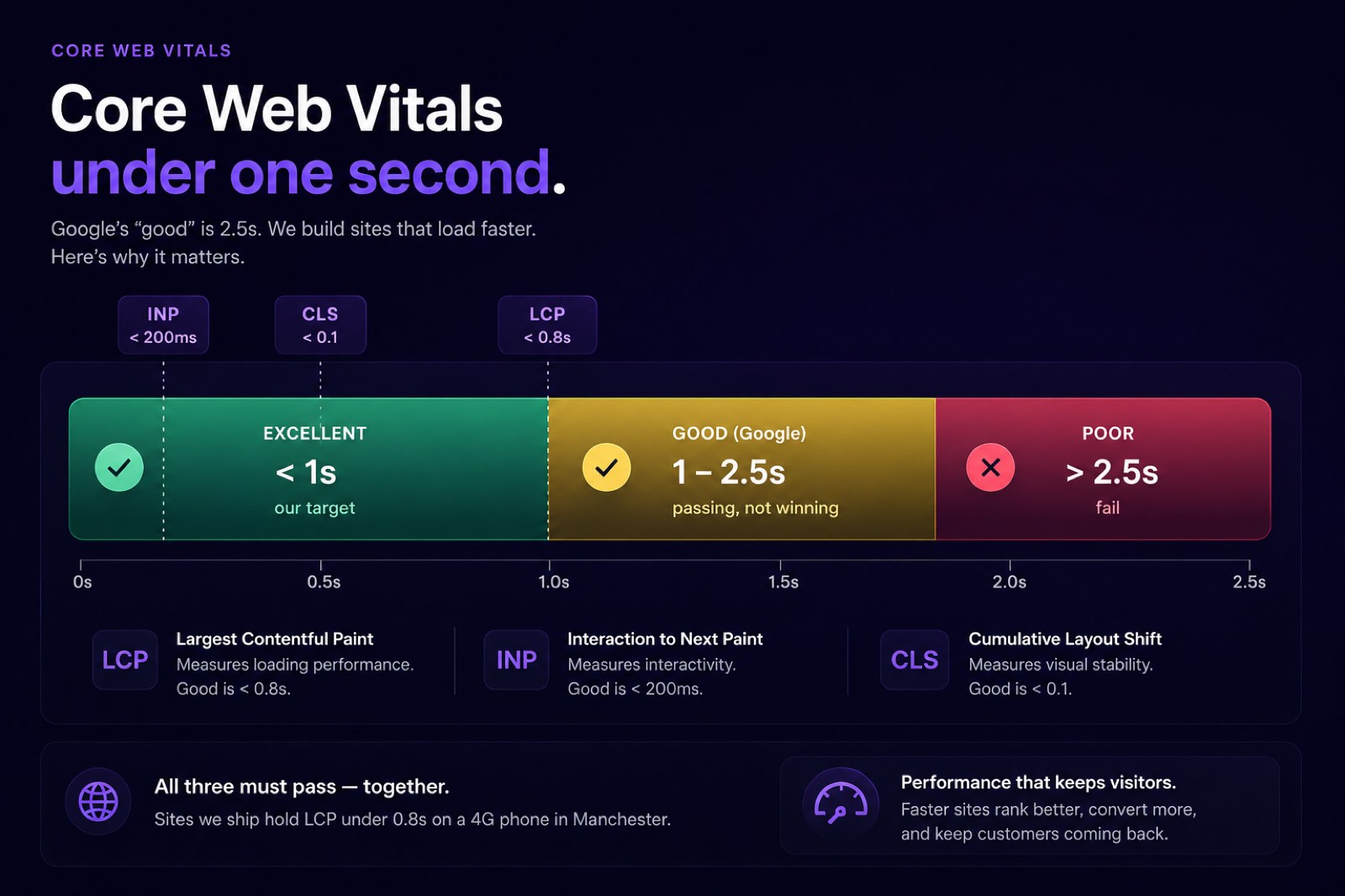
The /systems page commits to LCP under 1 second, INP under 200ms, CLS under 0.05, and Lighthouse Performance ≥ 95, measured on 4G throttled mobile. The previous post on this thread, the 0.05-second test, explains why those numbers matter (on Google’s own Think with Google data, as page load time goes from 1 second to 3 seconds, the probability of a mobile visitor leaving increases by roughly 32%). This piece is how the numbers get hit.
The benchmark is a representative worked example of the pattern we see in rebuilds: a typical service-business site on a page-builder platform clocking LCP at 4.8 seconds on a Moto G4 / 4G WebPageTest profile, rebuilt on Vercel London (lhr1) and shipping at 0.71 seconds on the same profile. The numbers are illustrative of the pattern, not a measurement of a specific named client. The techniques below are the diff.
What 4G throttled mobile actually means
Before the techniques: the test profile, because “fast” is meaningless without one.
WebPageTest’s “Mobile - Slow 4G” profile is 1.6 Mbps down, 750 Kbps up, 150ms RTT, throttled CPU at 4× Moto G4 (a 2016 Android device with two underclocked Cortex-A53 cores). That is not the median UK 4G connection in 2026, it is roughly the worst tenth percentile. Google’s Core Web Vitals reporting in Search Console uses field data weighted toward the slower end. So a site that hits LCP < 1s on this profile will hit it consistently in the field.
The Vercel London location matters because every TCP round-trip from a UK visitor to lhr1 is roughly 5-20ms. Every round-trip to AWS US-East-1 is 70-120ms. Eight round-trips at 100ms each is 800ms of LCP gone before a single byte arrives. That is the entire LCP budget, spent on packets that crossed the Atlantic for no reason.
Technique 1, image priority hints
The single biggest LCP lever on any UK SMB site is the hero image. Browsers do not know which image is the hero, they treat all <img> tags the same. The fetchpriority="high" attribute tells the browser “this one, before everything else.”
<img
  src="/hero.avif"
  alt="Service-business exterior, Victorian sandstone, brass plate signage."
  width="1600"
  height="900"
  fetchpriority="high"
  decoding="async"
/>
Three things in that snippet matter. fetchpriority="high" moves the image to the front of the queue. width and height prevent the layout shift that would otherwise tank CLS. decoding="async" lets the browser paint the rest of the page while decoding finishes.
The discipline is exactly one fetchpriority="high" per page. Two high-priority images mean neither is high-priority. The hero gets it; everything else does not.
Technique 2, AVIF originals, under 60KB
Hero images in 2026 should be AVIF. Not WebP, not JPEG. AVIF compresses 30-50% smaller than WebP at equivalent perceptual quality, and browser support is 95%+ in mid-2026. The fallback path is <picture> with a JPEG <source> for Safari iOS < 16, but for most UK SMB audiences a single AVIF works.
Target file size for the hero AVIF: under 60KB. A 1600×900 hero at quality 60 typically lands at 35-50KB. Anything over 80KB and the LCP budget is hostage to the file size, not the CDN.
Pipeline: source PNG/JPG → sharp or avifenc → quality 60-65, speed 4 → ship. UK Web Marketing builds run the conversion at build time via Astro’s image service, so the AVIF is generated once per content change, not on every request.
Technique 3, preload the hero, preconnect the third-party
Two <link> tags in <head> that save roughly 200-400ms each:
<link
  rel="preload"
  as="image"
  href="/hero.avif"
  type="image/avif"
  fetchpriority="high"
/>
<link rel="preconnect" href="https://plausible.io" crossorigin />
The first tells the browser to start downloading the hero while the HTML is still being parsed, instead of waiting until the parser reaches the <img> tag. On a 4G connection, that overlap saves a full round-trip, often 150-250ms.
The second opens a TCP + TLS connection to the one third-party domain that survived the audit (in our case, Plausible Analytics) before the script tag for it gets parsed. Saves another 100-200ms when the analytics request fires.
Two tags, ~400ms back in the LCP budget. The discipline is not adding more. Every additional preconnect costs DNS + TLS setup capacity; three preconnects starts harming the priority of the hero itself.
Technique 4, critical CSS inlined under 14KB
The 14KB number is not arbitrary. It is the size of the initial TCP congestion window (initcwnd = 10 segments × ~1460 bytes per segment ≈ 14KB), the amount of data the server can send in the first round-trip before waiting for an ACK. CSS that fits in that first window arrives in one round-trip; CSS that does not, does not.
The technique: inline the CSS needed to render above-the-fold into <head>, defer the rest. Astro’s astro:assets and the Critical plugin both automate this. Hand-rolled, the rule is: a stylesheet over 14KB needs splitting into a critical block (inlined) and a non-critical block (<link rel="stylesheet"> with media="print" onload="this.media='all'" to defer).
Target: critical CSS at 8-12KB gzipped. Below 8KB is rare and usually means the design is missing rules; above 14KB is a budget overrun.
Technique 5, font subsetting to a single Latin file
A standard variable font ship is 80-180KB. A subsetted Latin file with the actual glyphs the site uses is 22-32KB. The 100KB saving is roughly 500ms on a 4G connection.
The technique is glyphhanger or fonttools subset to produce a .woff2 containing only latin and latin-ext ranges. Then load with font-display: swap so text renders in a system fallback until the custom font arrives:
@font-face {
  font-family: "Inter";
  src: url("/fonts/inter-latin.woff2") format("woff2");
  font-display: swap;
  font-weight: 100 900;
  unicode-range: U+0000-00FF, U+0131, U+0152-0153, U+02BB-02BC,
                 U+02C6, U+02DA, U+02DC, U+2000-206F, U+2074,
                 U+20AC, U+2122, U+2191, U+2193, U+2212, U+2215;
}
font-display: swap is the one that matters. The LCP element is usually text, not the hero image, on content-heavy pages, and font-display: block (the historical default) would make LCP wait for the font, which costs you the entire technique. swap renders the text in fallback immediately and re-paints when the custom font lands.
Technique 6, zero render-blocking JavaScript
The hardest rule, and the one that distinguishes a real performance posture from a stated one.
By default, every <script src="..."> in <head> blocks rendering until the script downloads, parses, and executes. On a UK SMB site, the typical render-blocking scripts are: Google Analytics, a chat widget, a cookie consent banner, a “back to top” button, a hero carousel.
UK Web Marketing builds ship zero render-blocking JS by default. The techniques:
- Analytics is
defer-loaded. Plausible’s snippet is<script defer data-domain="..." src="..."></script>. Thedeferattribute moves execution to after the HTML parser finishes, never blocking render. - Chat widgets are excluded. No Intercom, no Drift, no Tidio loaded by default. If a client wants chat, it is an opt-in island that loads on a user action.
- Cookie banners are server-rendered. Because the site does not use cookies for tracking (Plausible is cookieless), there is no banner to load. Our cookieless, EU-hosted analytics comparison covers the posture.
- Hero carousels are CSS-only or replaced with static heroes. A JS carousel ships 30-80KB of render-blocking work for a feature 6% of visitors interact with. Static hero is the default.
- Astro islands are
client:visible. Interactivity hydrates only when the component scrolls into view, never on initial render.
The cumulative effect: a typical UK Web Marketing page ships under 40KB of JS, deferred, on the entire page. Compared to a Wix site shipping 1.4-2.8MB of JS, half of it render-blocking, the LCP difference is not a tuning question, it is a different category of artefact.
Technique 7, where INP goes to die
A 200ms INP budget is generous if the page has no hydration cost. It evaporates the moment a hydration-by-default framework is in the stack.
The typical INP killer in 2026 is a Next.js Pages Router site (pre-App Router) that hydrates the entire page tree on load. On a Moto G4, hydrating a moderately complex page tree takes 280-540ms. Every interaction in that window is queued behind the hydration work, so the first click after page load sees an INP of 300-500ms, well above the 200ms threshold.
The fix is architectural, not tactical: pick a static-first framework. Astro hydrates only the islands you mark client:*. The default page tree has zero hydration cost. INP on a typical UK Web Marketing site lands at 40-90ms, with the entire budget for the actual interaction, not the framework warming up.
This is also why React Server Components matter in 2026, they let Next.js sites ship more zero-hydration HTML, narrowing the gap. Astro is still ahead on the default case.
The cold-cache measurement that matters
The number that matters is the cold cache render, first visit, no service worker, no cached assets. Hot-cache LCP is usually 200-400ms regardless of build quality, because everything is already in memory. Cold cache is the visitor’s first impression.
The representative rebuild example again, cold cache, Moto G4 / 4G:
- LCP: 0.71s (target < 1.0s)
- INP: 64ms (target < 200ms)
- CLS: 0.01 (target < 0.05)
- Lighthouse Performance: 99 (target ≥ 95)
- Total page weight: 188KB (HTML 18KB, CSS 11KB inlined, AVIF hero 42KB, Latin font 28KB, JS 36KB deferred, favicon + meta 53KB)
The same page as a typical page-builder build, same profile: LCP 4.8s, INP 412ms, CLS 0.34, Lighthouse Performance 31, total page weight 4.6MB. The specific figures are illustrative, but the gap is the shape we see whenever a page-builder site is rebuilt on this stack.
What this means commercially
The performance budget is a feature, not a vanity metric. On Google’s own data, the difference between a 1-second and a 6-second LCP is roughly half the mobile visitors who would have stayed. For a Leeds plumber paying for AdWords clicks at £3.50 a click, half is the difference between profitable and unprofitable.
The seven techniques above are a UK Web Marketing build default. They do not cost extra. They are not an optimisation pass at the end of the build, they are the way the build ships.
If you want to know what your current LCP looks like: free site audit. If you want the techniques applied to your site: managed website service, or as a standalone engagement, a technical SEO consultant.
Related: 0.05 seconds, the test your website is failing, Why your website is costing you work, Should I just build on Wix?.
Frequently asked questions
How do you get LCP under one second?
Sub-1-second LCP is a stack of techniques, not a hosting trick: priority hints on the hero image, an AVIF hero under 60 KB, preload and preconnect, critical CSS inlined under 14 KB, font subsetting with font-display: swap, and zero render-blocking JavaScript. As a representative example, applied in order they can take a typical service-business rebuild from around 4.8s on a page-builder platform to around 0.7s.
What image format is best for a fast hero image?
AVIF. It compresses 30 to 50 percent smaller than WebP at equivalent quality, with 95 percent-plus browser support in 2026. Target the hero AVIF under 60 KB; a 1600x900 hero at quality 60 typically lands at 35 to 50 KB. Anything over 80 KB puts your LCP budget hostage to the file size.
Why is critical CSS limited to 14KB?
14 KB is the size of the initial TCP congestion window, the amount of data the server can send in the first round-trip before waiting for an acknowledgement. CSS that fits in that first window arrives in one round-trip; CSS that does not, does not. Target critical CSS at 8 to 12 KB gzipped.
Does hosting location affect Core Web Vitals?
Yes, significantly. Every round-trip from a UK visitor to Vercel London (lhr1) is roughly 5 to 20 ms, versus 70 to 120 ms to AWS US-East-1. Eight round-trips at 100 ms each is 800 ms of LCP gone before a single byte arrives, on packets that crossed the Atlantic for no reason.
Why does framework choice affect INP?
Hydration-by-default frameworks add 200 to 400 ms to every interaction. A Next.js Pages Router site that hydrates the whole page tree can take 280 to 540 ms on a Moto G4, pushing the first click's INP well above the 200 ms threshold. Astro hydrates only the islands you mark, so its default page tree has zero hydration cost.